


Instagram has over 2 billion users, but it’s not for everyone. Endless reel scrolling can waste time. It might hurt your mental health or career. Businesses may spend on ads with little success. These reasons drive many to learn how to delete Instagram account with easy steps.
Ready to leave Instagram? This guide makes it simple. Follow clear steps to permanently delete or temporarily deactivate your account. It works on mobile or desktop. Start your journey to disconnect now!
Why Do People Delete Their Instagram Accounts?
Many people decide to delete their Instagram accounts for personal or business reasons. Personal users want better mental health, less pressure to compare with others, or more free time. Businesses often struggle with reaching the wrong audience, low engagement, brand issues, or poor ad returns.
Other reasons include privacy concerns over data usage or a shift to other platforms for business growth. So here i guide you how to delete Instagram account to take control.

Reasons to Delete Your Instagram Account:
- Mental Health: Reduce stress and anxiety from constant scrolling.
- Less Comparison: Avoid pressure to match others’ curated lives.
- Save Time: Free up hours spent on reels for meaningful activities.
- Wrong Audience: Small Businesses may not reach their target market.
- Low Engagement: Posts get fewer likes, comments, or shares.
- Brand Issues: PR problems or negative feedback harm reputation.
- Poor ROI: Ad spending doesn’t deliver expected results.
- Privacy Concerns: Worries about how Instagram uses personal data.
- Platform Shift: Focus moves to other platforms for better opportunities.
Difference between Deleting and Deactivating an Instagram Account
If you are confused about the terms Instagram account deactivation and deletion, here is the simple difference:
Deleting Your Account
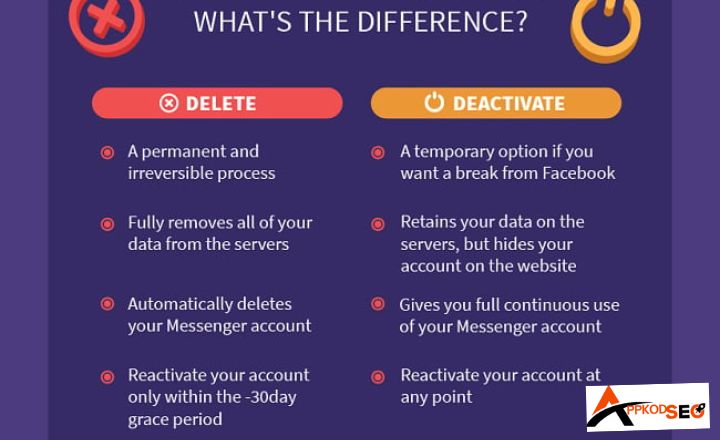
Deleting your Instagram account means that you are cutting your relationship off from this profile (removing everything, including photos, videos, comments, likes, and followers). You can recover this within 30 days but not after that.
Then, you must create a new account to return to the platform. Complete or permanent account deletion is best for people who want to leave social media for good and have privacy concerns or want to wipe their brand presence clean.
Deactivating Your Account
Deactivating your Instagram account means hiding your account, but nothing is lost. You can reactivate it anytime by logging back in, and it is useful for short breaks or mental detox. Also, it’s great if you are going to pursue business or personal activity temporarily.
How To Delete Instagram Account With Easy Steps on Different Devices
On iPhone
If you are an Apple device (iPhone) user, you can follow these steps to delete your Instagram account:
- Open the Instagram app and log in.
- Go to your profile and tap the menu (top right).
- Tap Settings and then Account.
- Scroll to the bottom and tap Delete account.
- Choose Delete account again (not Deactivate).
- Tap Continue deleting the account.
- Select a reason from the dropdown (e.g., “Too busy”).
- Enter your password to confirm.
- Tap Delete.
On Android
Android users can’t delete Instagram through the app, but you can do it using your mobile browser. Here’s how:
- Open your mobile browser and go to this link (https://instagram.com/accounts/remove/request/permanent/).
- Enter details of the account and log in to it.
- Choose a reason for deletion from the dropdown menu.
- Re-enter your password.
- Click Delete.
On Desktop
Are you using Instagram on PC and want to delete it? Follow these simple steps:
- Visit https://instagram.com/accounts/remove/request/permanent/
- Log into your account if you haven’t already.
- Select a reason for deleting your account.
- Enter your password again.
- Click Delete.
How to Deactivate Your Instagram Account
If you’re not ready to permanently delete your Instagram account, here are simple steps to deactivate it:
- Log in to your Instagram account.
- Click on your profile icon in the top right.
- Select Edit Profile.
- Scroll down and click Temporarily deactivate my account.
- Choose a reason from the dropdown.
- Re-enter your password.
- Click Temporarily Deactivate Account.
Remember: If you deactivate your account, just log in at any time to bring your account back to life. All your posts, comments, and followers will be restored.
Conclusion
Constant Instagram use can drain your energy, waste valuable time, and pull you away from important tasks. It’s okay to step back. You can choose to permanently delete your account or take a temporary break.
This guide showed you simple steps to delete or deactivate your Instagram account on mobile or desktop. The process is quick and easy, taking just a few minutes. Decide what works best for you deletion or deactivation. If Instagram no longer brings joy, it’s fine to let go. Prioritize your time and well-being.
