


When you open Google Chrome, you’re instantly greeted with the phrase “Search Google or type a URL.” But what does it really mean, and how can you use it to your advantage?
Whether you want to search for information, visit a specific website, or troubleshoot issues when this bar isn’t working properly, understanding this feature can make your browsing smoother and faster. This guide explore the meaning behind this phrase, how it works, and common fixes when it doesn’t respond.
What is Search Google?
Search Google is a method of searching for something on the Internet by using the Google search engine. This term explains how different Internet browsers (especially Chrome) allow people to input a term or a phrase in the Google search bar and look for it on the Internet.
It has now become one of the most common ways of searching the Internet and finding required content like images, videos, and websites in general. With this method all you have to do is input a word or a sentence in the search box and the search engine will provide relevant information to you.
What is Type A URL?
Type a URL is another method of finding information on the Internet. However, it is very different from Google Search and is more direct as well. In this method, you use a website’s URL address (https://techmymind.org/) to locate it on the Internet.
People also use this method frequently to access a website directly without having to go through different steps. However, it’s not as frequent as the other searching methods.
Benefits and Drawbacks of Search Google
Now, I am going to discuss the benefits and drawbacks of the Search Google method. It will help us settle the Search Google or Type a URL debate.
Benefits
- It is a very convenient way of finding information on the Internet.
- You don’t have to remember the exact URL of a website.
- It is good for browsing information in general. That is because Google provides you with relevant information to the search query, such as videos, images, and even books.
- It is a useful method in case you don’t know the exact spelling of something you’re looking for. Google uses its algorithms to understand your search intent and then provide you with accurate results.
Drawbacks
- You’ll be exposed to a lot of unnecessary information in case you’re looking for something specific.
- Usually, sponsored websites are shown at the top results, which can be pretty annoying.
- It is a time-consuming process as you may have to go through different pages to find a site.
- Content that isn’t fully SEO-optimized will go back to the last pages, and you’ll have a hard time finding it.
Benefits and Drawbacks of Type a URL
Now, I am going to shift the discussion towards the benefits and drawbacks of the Type a URL method. Here are their details:
Benefits
- It is a fast way of accessing a piece of information. You simply have to paste the link and then hit enter to access it via a browser.
- You get to access the website directly without having to go through other content.
- It is a more secure and private way of accessing something on the Internet.
- You can access websites that aren’t fully optimized for search engines.
- It is a good method in case you don’t want to view ads or sponsored search results.
Drawbacks
- You need an accurate URL address to access a site. Using a misspelled address will cause an error.
- You cannot find relevant information on the Internet through this method.
- There are no auto-suggestions or correction options available in this method.
- You might miss the latest and trending updates related to a topic.
The Usage Methods of Search Google and Type A URL
Using both Search Google and Type a URL is very easy.
I’ve discussed them in detail below:
How to use Search Google?
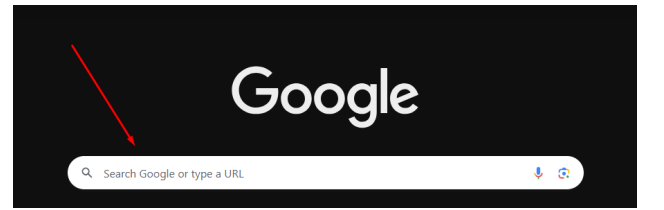
- Open an Internet browser (preferably Chrome).
- Now, type anything that you want to search for in the “Search Google or Type A URL” section.
- You will see all the relevant information related to the searched term.
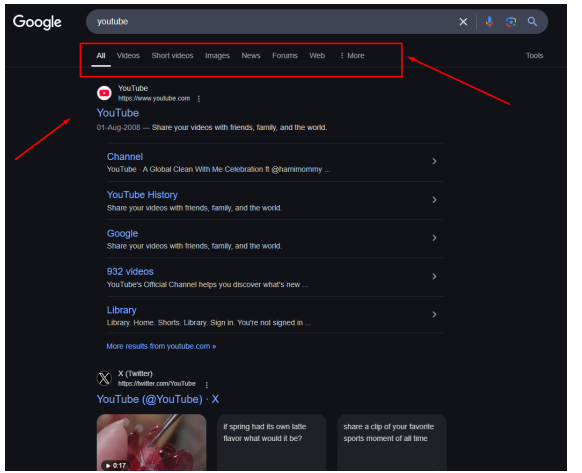
- Now, you can consume any type of information that you want to.
How to Use Type a URL?
- Open an Internet browser.
- Enter a site’s URL address in the browser’s omnibox and hit Enter.
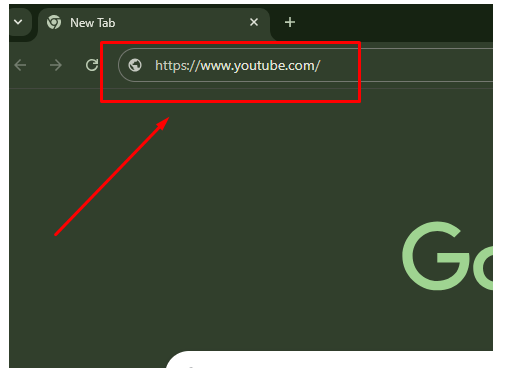
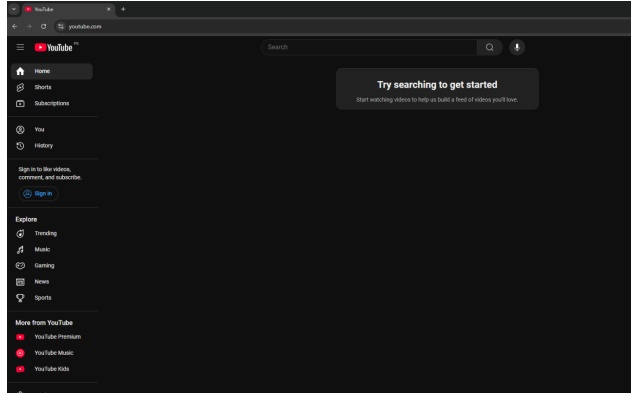
- You’ll be taken directly to the searched website.
Search Google or Type a URL – Head-to-Head Comparison:
| Search Google | Type a URL |
| A little bit time-consuming. | Fast and time-saving. |
| Does not require typing accurate queries. | Requires typing accurate queries. |
| Helps find useful, relevant information. | Provides only the searched information. |
| Google algorithms refine search terms. | Google does not make changes to the searched addresses. |
| Displays ads and sponsored sites at the top search results. | No ads or sponsored data are shown. |
| Not very useful for low-ranking websites. | The ranking of a website does not matter while searching for it. |
| Good for finding the latest information. | Accessing the latest information isn’t guaranteed. |
Search Google Or Type A URL – Which One to Pick?
The choice really depends on your intent. If you already know the exact web address and want to reach a site quickly, typing the URL directly is the fastest way. If you’re looking for general information, researching a topic, or aren’t sure of the exact website, using the Google search option is the better route.
Both methods have their own advantages, and it comes down to what best fits your browsing needs at the moment. For website owners and marketers, tools like Google Search Console can also help you understand how users are finding your site whether they’re typing your URL directly or discovering it through Google searches.
Conclusion
Search Google or Type a URL is a famous debate going on the Internet. These are two main ways of searching for something on the Internet. Search Google requires typing a word or a phrase directly into the Google search engine to find relevant information.
The URL method requires typing the URL address of a website to access it directly. You should understand the benefits and drawbacks of each method and then pick a method that is the most suitable for you.
